
Design
I've always been interested in design as I watched my previous EIC work hard in class to get The Pinion print ready. When I was first given access to InDesign via my sophomore year through my EIC, I was able to try design my own spreads. I have bought the Adobe programs on my own laptop which allowed me to play around with it at home, while also allowed me to work on the print paper at home.
Learning how to you Adobe InDesign and Adobe Illustrator was a learning curve, but I found it came to me naturally. I played around with it on my free time along with help from a Graphic Design class I took at school. Although InDesign gives me a headache from time to time [my peers finding joy in my misery while also trying to comfort me], seeing the final end product is always worth it.
Vol. 103 No.2 SY 2024-25 | Hall of Honor

Designing the layout for this article proved to be a challenge, but it was worth it in the end. I used past Pinion spreads for ideas and as a reference for when I designed the page. The article itself was about an McKinley alumnus who contributed and gave back to the community in many different ways. I had to figure out how to share his story Although I wish I could go back and change the layout and design for it, I'm proud of how it currently looks.
Vol. 103 No.2 SY 2024-25 | Shoots Summit

When it came to the design and layout for this article, I took heavy inspiration from what this article is about. That being about a group of graphic design and video production students in a competition. With that in mind, I took the route of making the spread look like a YouTube video layout with its design. I first sketched out the possible layout and design, so I had a better sense of what I wanted to do. Then I created smaller details within Illustrator [such as the like button and share button.] I then imported those designs into InDesign, where I laid out the more blocky designs and added the text. Looking back on the spread it has to be one of my favorite designs to date.
Vol. 104 No.1 SY 2025-26 | AI Art
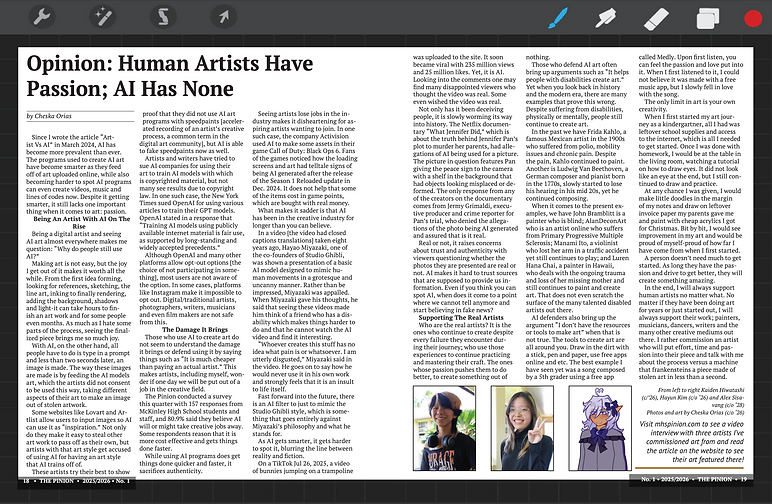
With this layout, I wanted to emphasize the art aspect somehow, so I did it with the background design. The background design for the article took heavy inspiration from the digital art app, Procreate. I chose to base it on that art app because I use it often to create art for my other articles or create art. I made the smaller elements of it on Illustrator before putting it over onto InDesign, then combing everything. Although there was so much more I wanted to do with the spread, I had to take into consideration the readability of the article, along with space provided. Although I wanted to add in more niche elements related to the art program, I scrapped them so people would be able to read the article clearly.
Design Drafts/Thumbnails
Sometimes the draft dose not look the same as the final product!


